
.png)
 简体中文
简体中文 
How to Make a Vocal Cover: A Step-by-Step Guide for Beginners
Most beginner singers don’t stall because they can’t sing. They stall because they don’t know where to start. The recording setup feels intimidating, the room sounds wrong, and by the time the mic is ready, the energy for a good take has already faded.
This guide cuts through that friction. You’ll learn how to plan a vocal cover that suits your voice, set up a recording environment that works, and capture a performance worth sharing — whether you’re recording in a bedroom or a hotel room. The steps apply to any genre, any platform, and any skill level.
Planning Your Vocal Cover Before You Hit Record
Choose a Song That Fits Your Voice, Not Just Your Taste
The most common planning mistake is choosing a song based on how much you love it rather than how well it suits your voice. Love for a song matters — but if the key sits outside your comfortable range, or the original vocal style is the opposite of yours, you’ll spend most of your session fighting the material instead of performing it.

Before committing to a song, sing through the chorus a few times without any backing track. Notice where it feels natural and where it feels forced. If you’re consistently reaching for notes at the top or bottom of your range, either transpose the key or reconsider the song entirely.
Also think about the audience side. Covers of evergreen songs — tracks people already love and search for — tend to earn more organic visibility on YouTube and streaming platforms than obscure deep cuts. Trending songs work too, but they have a shorter discovery window.
Map Your Performance Approach
Once you’ve chosen your song, listen to the original two or three times with intention. Pay attention to where the energy peaks, where it drops, and where the singer makes interesting choices. Then step away from the recording and sing the song in your own natural voice, without mimicking the original.
This exercise usually reveals your instinctive interpretation — and that instinct is worth protecting. Before you record a single take, identify two or three moments in the song where you’ll do something distinctly yours: hold a note longer, bring the volume down unexpectedly, or let a lyric land with more space around it. These small decisions are what make a cover feel like a performance rather than a copy.
Preparing Your Recording Environment and Mindset
Create a Usable Recording Space
You don’t need acoustic panels or a treated booth. You need a consistent space with minimal echo and a low ambient noise floor. A bedroom closet with clothes hanging on all sides is genuinely one of the better recording environments available to most home singers — the soft materials absorb reflections without costing anything.

If a closet isn’t practical, record in a room with soft furnishings: rugs, curtains, upholstered furniture. Stand away from bare walls and corners. Record during the quietest hours of your day — early morning often beats late night for ambient noise consistency.
One thing worth knowing: when your microphone and monitoring are working well together, small room imperfections matter far less. You’ll hear this clearly in the next section.
Warm Up and Stay in Performance Mode
Treat the first 15 minutes of any session as a warm-up, not a recording window. Scales, lip trills, gentle sirens — anything that brings blood flow and flexibility to your voice before you commit to a take. Singers who skip this step often record their best-feeling performance early, then wonder why the playback sounds tense.
Keep your session focused: 60 to 90 minutes is the productive window for most untrained voices. Beyond that, fatigue starts to affect pitch accuracy and dynamic control in ways you can’t always hear in real time. Have your backing track queued and your space ready before you start warming up, so nothing interrupts the transition into performance mode.
How the Hollyland MELO P1 Simplifies the Vocal Cover Workflow
This is where the actual recording begins — and where most beginners lose momentum. Sourcing a condenser microphone, audio interface, monitoring headphones, and recording software separately takes time, money, and a learning curve that has nothing to do with singing.

The Hollyland MELO P1 is built around a different premise: give singers one integrated system that handles everything from microphone capture to signal processing to monitoring, and let the performance be the focus.
One Device, Zero Guesswork

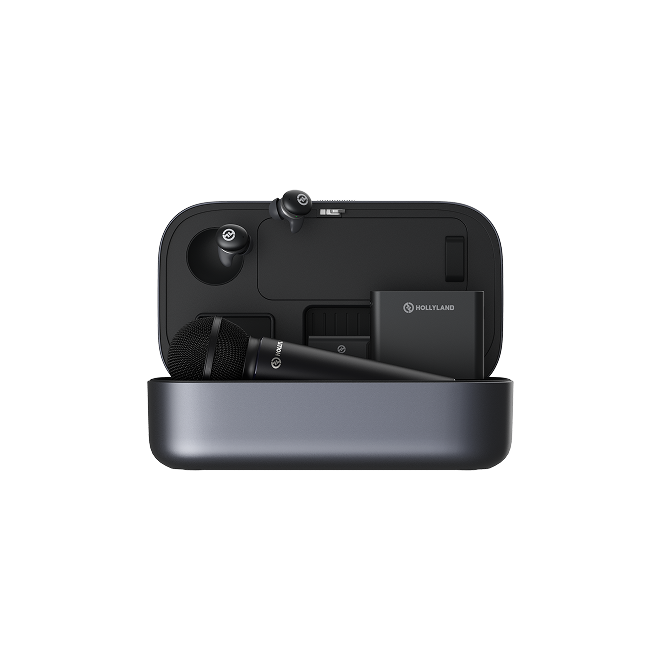
The MELO P1 pairs a wireless handheld microphone with a Smart Audio Mixer and a set of monitoring earphones. Together, these three components handle what would otherwise require four or five separate devices. The wireless mic connects to the mixer without cables or configuration; the mixer processes the signal and sends it to your phone or computer; the earphones let you hear yourself in real time as the recording hears you.

Setup takes minutes. That matters more than it sounds — because every minute spent troubleshooting cables or driver settings is a minute your vocal warm-up is cooling down.
Monitoring While You Sing
Real-time monitoring is one of the most underrated tools in vocal recording. Without it, singers react to the sound bouncing around the room rather than the sound the microphone is actually capturing. This leads to overcompensating — pushing harder than necessary, going sharp on sustained notes, or pulling back on phrases that actually need more support.

With the MELO P1’s monitoring earphones in, you hear your voice through the system — processed, balanced, and in context with the backing track. This immediate feedback loop closes the gap between what you feel and what the recording captures. The practical result: fewer takes, more consistent intonation, and a cleaner edit session afterward.
Vocal Presets and Backing-Track Control
The MELO P1 includes a preset library that gives your voice a tonal starting point before you commit to a full take. These aren’t auto-tune shortcuts — they’re processed environments (different reverb characters, warmth profiles, compression settings) that help you hear how your voice will sit in the finished mix.

For a song like The Beatles’ “Let It Be,” a baritone singer with a smooth, warm tone might pull up a 1970s-style preset to match the song’s sonic character. The goal isn’t to sound like Paul McCartney — it’s to give the voice a context that fits the material, so the emotional delivery (steady breath support, lyric-driven phrasing, quiet intensity) can land the way it’s intended. From that starting point, the MELO P1 lets you adjust reverb, compression, and level in real time without stopping the session.

Backing-track control is built into the mic body itself. Volume, playback management — all of it stays in your hand. You never have to break your focus to reach for your phone.
Recording Directly to Your Phone or Computer
The Smart Audio Mixer outputs a processed, balanced signal directly to your phone or computer via a standard connection — no driver installation, no routing configuration, no additional software required. For singers publishing on YouTube, TikTok, or Instagram, this means the capture is already clean and polished before any post-production happens.
For those who want to go further, the same signal routes cleanly into a DAW for comping and mixing. But the MELO P1 recording is already a strong source — not a rough scratch track. You’re building on something solid rather than trying to rescue something fragile.
How to Make a Vocal Cover Sound Like Your Own
Gear gets you a clean recording. What happens inside that recording is entirely your decision.
Rearrange the Melody Without Losing the Song
The most accessible way to personalize a cover is through phrasing — where you breathe, where you hold, and where you let go. Try sustaining a note the original cut short. Try pulling back on a phrase the original pushed hard. Neither change requires advanced technique; both signal to the listener that they’re hearing an interpretation, not a replica.
One or two of these moments per song is enough. Over-ornamenting every phrase is the other common extreme — it draws attention to the technique rather than the song. The goal is to leave fingerprints, not rewrite the track.
Use Dynamic Contrast as Your Signature
Volume and intensity variation are what make a vocal performance feel human. Before you record, map the song’s emotional arc: where is the quietest moment, where is the peak, and what does the journey between them feel like? Then record with those landmarks in mind rather than performing at a consistent intensity throughout.
Soft moments are as memorable as powerful ones. A line delivered at half-volume with full emotional commitment will often outperform a belted chorus in terms of listener connection. Real-time monitoring makes dynamic shaping more intuitive — when you can hear yourself in context, you naturally calibrate rather than pushing blind.
Common Vocal Cover Mistakes (And How to Fix Them)
Copying the original too closely. Your listener already has the original. If your cover doesn’t offer a different angle — emotionally, dynamically, or interpretively — there’s no reason to choose yours over the source. Make a choice and commit to it.
Recording too early in the session. The voice takes time to open up. Treat the first 15 minutes as warm-up and resist the impulse to save early takes. They rarely hold up on playback.
Stopping mid-phrase to restart. Recording full takes and comping later produces better results than punching in every mistake. Stopping mid-phrase trains hesitation into your delivery and makes the session feel like an exam rather than a performance.
Ignoring the backing track balance. If the track is too loud in your monitoring, you’ll push your voice harder than the song requires. Set the backing track level before you start — it should support your voice, not compete with it.
Over-processing a weak take. Effects should enhance a controlled performance, not rescue an uncertain one. A grounded take with a light touch of reverb will always sound more confident than a shaky take buried in processing.
Skipping the playback audit. Listen back to at least one complete take before deciding the session is finished. What feels right in performance often reveals pitch drift or dynamic inconsistencies on playback that are easy to address if caught early.
FAQ: How to Make a Vocal Cover
Do I need a professional studio to record a vocal cover?
No. A treated home space — even a bedroom closet — and a reliable recording system can produce results ready for public platforms. The gap between home and studio has narrowed significantly with portable all-in-one hardware.
How do I find a backing track for my vocal cover?
Licensed instrumental tracks are available on platforms like Karaoke Version and Musicnotes. YouTube also hosts a large library of karaoke versions for popular songs. For originals or less common tracks, MIDI-based arrangements or commissioned instrumentals are options worth exploring.
How many takes should I record?
Aim for three to five complete takes rather than endless phrase-by-phrase repetitions. Comp the best moments across full performances — this approach produces more natural results and a faster edit session.
Can I record a vocal cover directly to my phone?
Yes, with the right hardware. The MELO P1 routes a processed, balanced signal directly to a phone without additional apps or software, making it one of the most straightforward phone-recording setups available for singers.
Do I need permission to post a vocal cover online?
Most major platforms — YouTube, TikTok, Spotify through distributors — handle licensing automatically through content ID and blanket licensing systems. For standalone audio distribution, you typically need a mechanical license. Always check the platform’s terms before publishing.
What’s the most common reason vocal covers sound amateur?
Usually a combination of two things: recording in an untreated room without monitoring, and performing at one consistent dynamic level throughout. Both are solvable — the first with environment adjustments and better gear, the second with intentional performance planning.
Conclusion
Making a vocal cover is a skill loop: plan, record, listen, improve, and repeat. The creative decisions — song choice, performance angle, dynamic shaping, personal phrasing — are what separate a cover worth hearing from one that sounds like a copy. The technical side exists to support those decisions, not to overshadow them.
The most important shift you can make as a beginner is to stop waiting for the perfect setup and start building the habit of recording. Every session teaches you something a tutorial can’t. The room will be imperfect. Some takes will miss. That’s not a problem to solve before you start — it’s the process itself.
If you want to reduce the technical friction so more of your energy goes into the performance, the Hollyland MELO P1 is worth a close look. Explore how it fits into your recording workflow — and then go make the cover.
Ready to Record Your First Vocal Cover?
The Hollyland MELO P1 gives you everything you need in one portable system — wireless mic, Smart Audio Mixer, monitoring earphones, and vocal presets — so you can focus on the performance, not the setup.


Subscribe us
to get the latest news!


