



































.png)
.png) Français
Français .png) Deutsch
Deutsch .png) Italiano
Italiano .png) 日本語
日本語 .png) Português
Português  Español
  简体中文
简体中文 
Millions of shoppers turn to Temu, one of the fastest-growing online shopping platforms, for unbeatable deals and everyday discounts. But what many users don’t realize is that Temu offers even more ways to stretch your budget, one of the most valuable being Temu Credits. These credits act like virtual money you can earn for free and apply toward your purchases, helping you unlock extra savings on items that are already budget-friendly.
In this article, we’ll break down what Temu Credits are, how you can earn them, and how to use them to get the best possible deals while shopping on Temu.
What Are Temu Credits?
Temu Credits are a type of virtual currency you can use on the Temu platform to lower your order total. Although they aren’t real money, they work like it when applied at checkout. Temu uses these credits to reward users for being active, joining promotions, and referring new customers.
How to Earn Temu Credits
Earning credits on Temu is easy. Watch for the following opportunities to earn them and enjoy extra discounts:
Participating in Promotional Events
Another easy way to earn Temu Credits is by joining promotional events. Temu often runs special activities where you can earn credits by completing simple tasks such as playing games, sharing products, or making a purchase. These events are a quick way to boost your credit balance.
Referral Programs
You can also earn credits through the Temu Referral Program by inviting new users to join. When someone signs up with your link or referral code and makes a purchase, you receive free credits. This is an easy way to earn extra credits, especially if you have friends or family interested in trying Temu.
Purchasing and Using Temu Credit
Temu doesn’t offer a way to purchase Credits directly. However, you do earn credits automatically with every purchase. The amount you receive depends on the price of the item; higher-priced purchases typically earn more credits.
Playing Games like Farmland
Temu also has games like Farmland and Fishland, which are an easy way to get some credits. All you have to do is open the game daily and claim the daily login bonus. You can also play games and complete in-game tasks to get free credits.
Here’s how to access games via Temu app on your mobile device:
- Open the Temu app, making sure you’re logged in.

- Tap on the search bar and type the game’s name that you want to play. It can be Farmland or Fishland, for instance.

- The game will load itself, provided that you’ve already played it before. Otherwise, you’ll get various options to play games and earn rewards like credits.

Delay in Shipping
If you have ordered something and it has not arrived within the specified timeframe, you may be eligible to receive free credits. Temu offers free credit for delayed orders and compensates its loyal customers for the inconvenience.
For this:
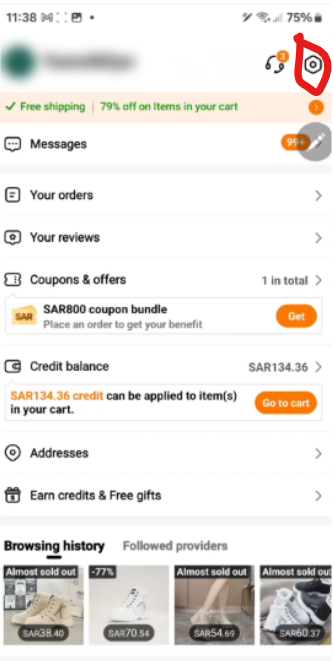
- Open the Temu app and tap on “You”.

- Navigate to the Settings section by tapping on the “gear icon” in the top right corner.
- Tap on “About This App”.
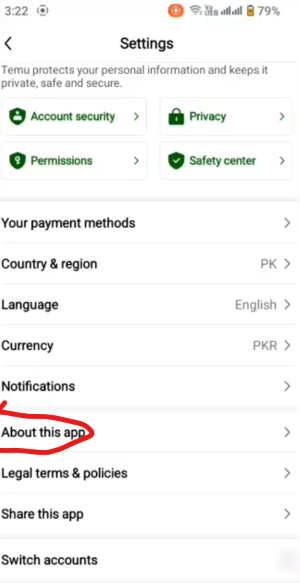
- Select “Contact Us”.

- On the next screen, select “Contact Us”.

- Message Temu Customer Service on the last day of the delivery to report that you haven’t received the order yet.

- They will check and offer you free credit.
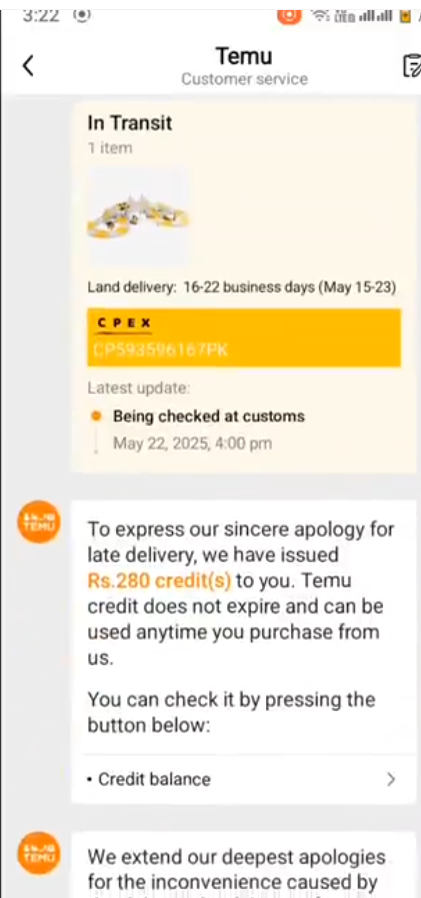
Refund amount as Temu Credit Balance
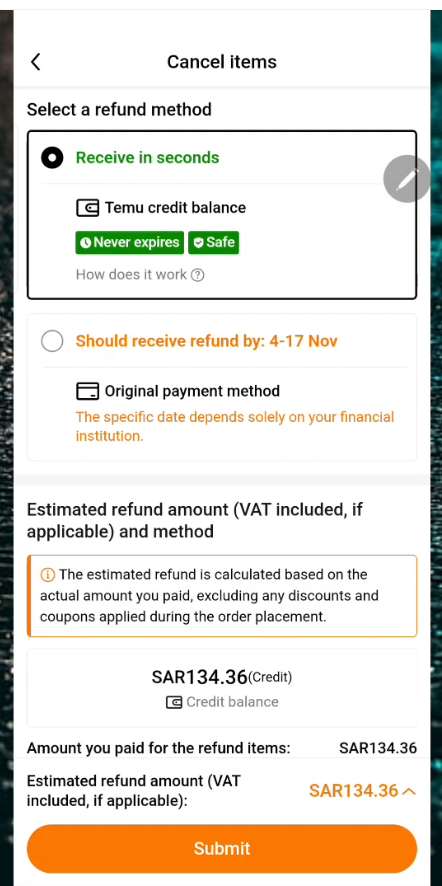
Lastly, you can also earn Temu Credits when you cancel an order and opt for a refund. It should arrive within seconds as Temu Credits rather than arriving back in your original payment method:
- Open the Temu app on your mobile device. Tap on “You”.
- Tap on “Your Orders”.
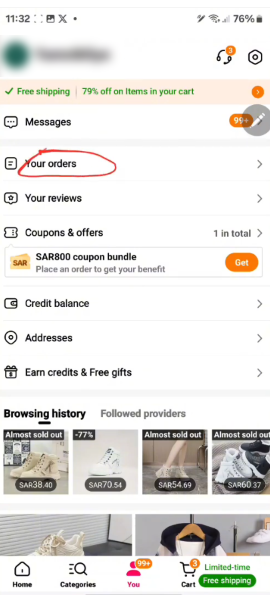
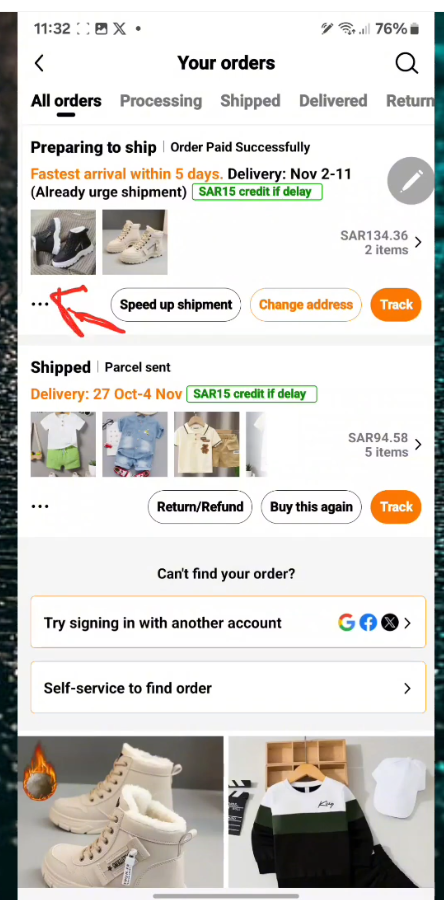
- Review the order you want to cancel and tap the “three dots”.
- Tap on “Cancel Items”.
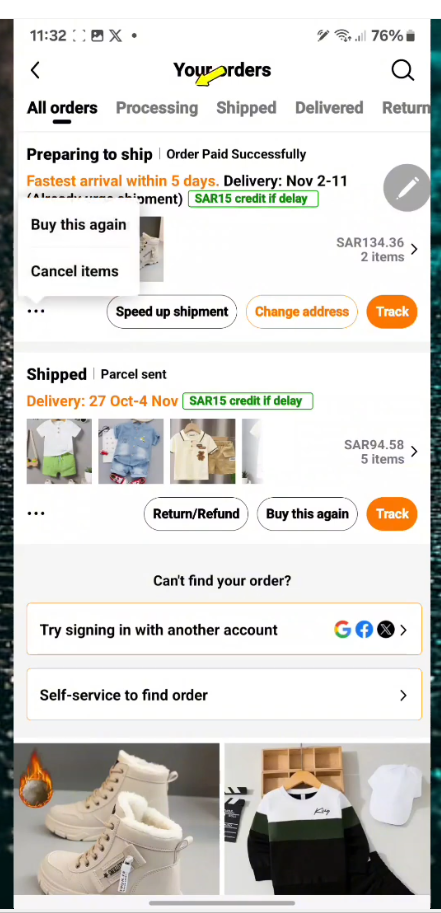
- You’ll be asked to confirm the cancellation of the order. Tap on “Continue to Cancel”.
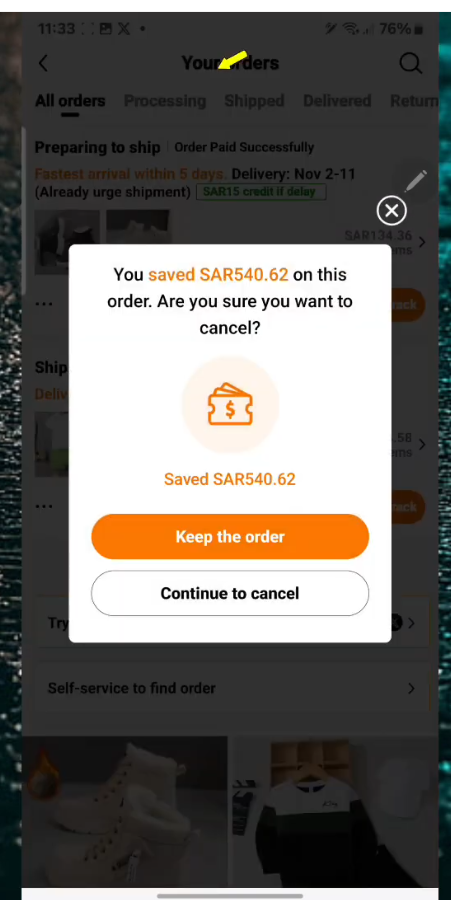
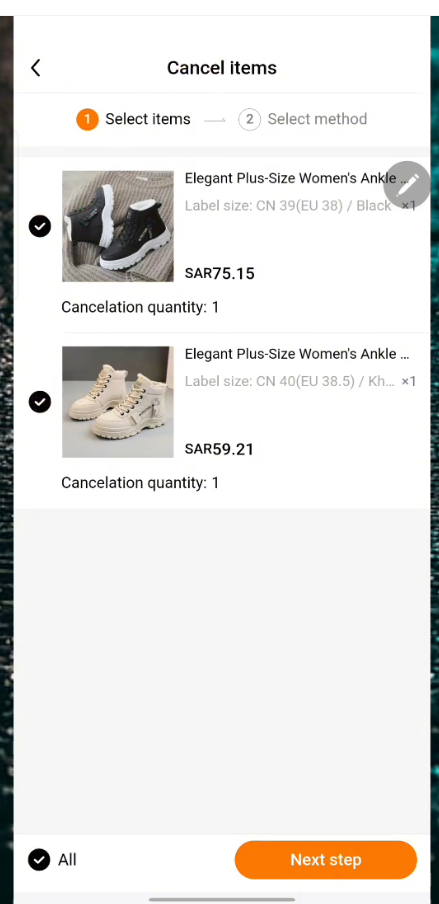
- Select the items that you want to cancel and tap on “Next Step”.
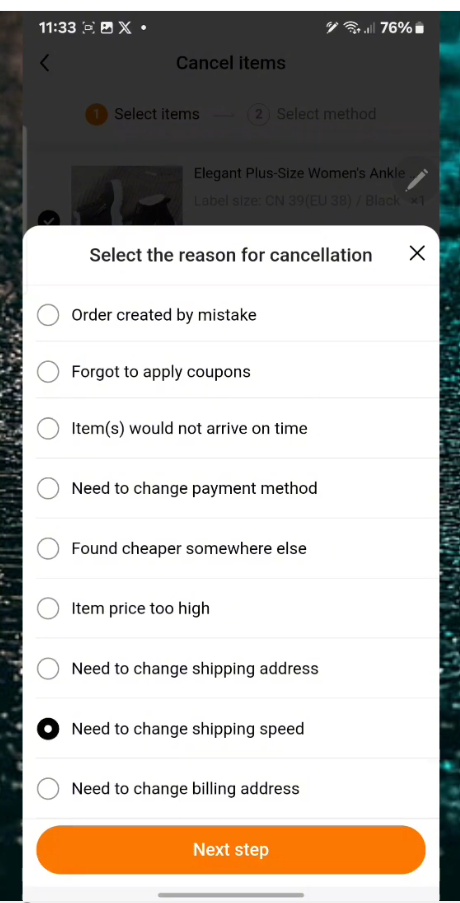
- On the next screen, select the cancellation reason and tap on “Next Step”.
- Select “Receive in Seconds” as the refund method and tap on “Submit”.
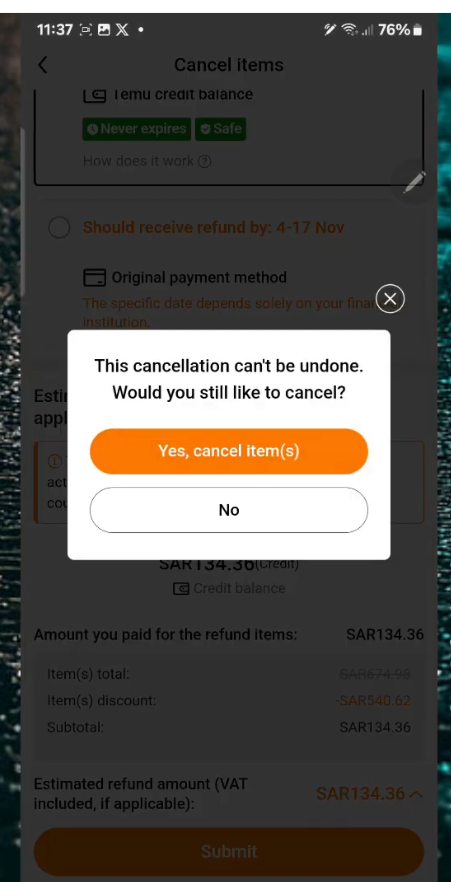
- On the next screen, tap on “Yes, Cancel Item(s)”. That will refund your amount as Temu Credits.
- Navigate back and tap on “You”.
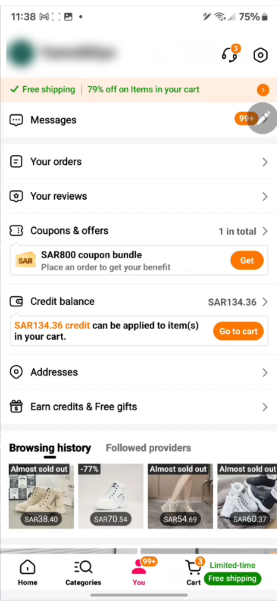
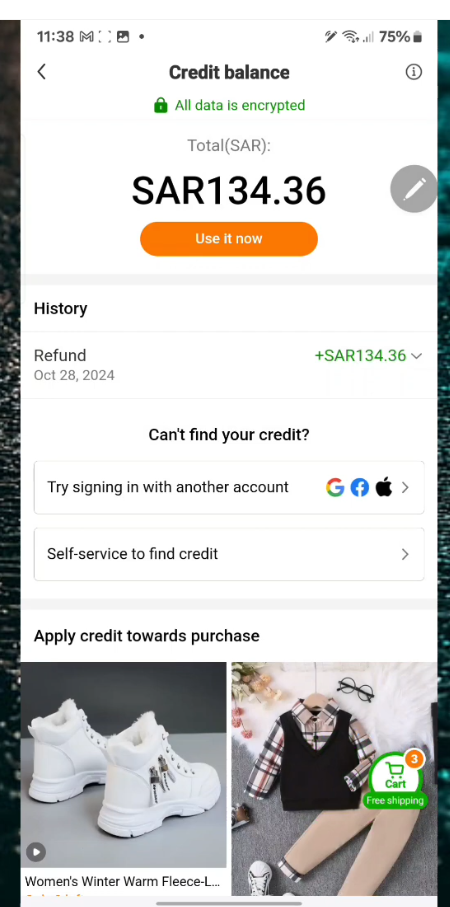
- Tap on “Credit Balance”. The Temu Credits you received will show up.
How to Use Temu Credits
Applying Credits at Checkout
If you have enough Temu credits and want to use them, it is very easy. When you have already filled your cart with the items you need and are checking out and reviewing your order, you’ll see an option to apply your credits. You can select how many credits you want to use and how many you want to keep in your account. The discount will be applied to the total price of your order.
Combining Credits with Other Discounts
One of the best things about Temu is that it lets you combine the credits with other discounts or coupons. This means you can save even more money on your purchases. If you have a coupon for 20% off and you also have Temu Credits, you can apply both to your order. This will allow you to reduce the price of your order even more.
Managing Your Temu Credit Balance
It is very important that you keep track of your Temu Credit balance so you know how much you have to spend. You can check your balance in your account settings or on the checkout page. The app or website will clearly show how many credits you have available.
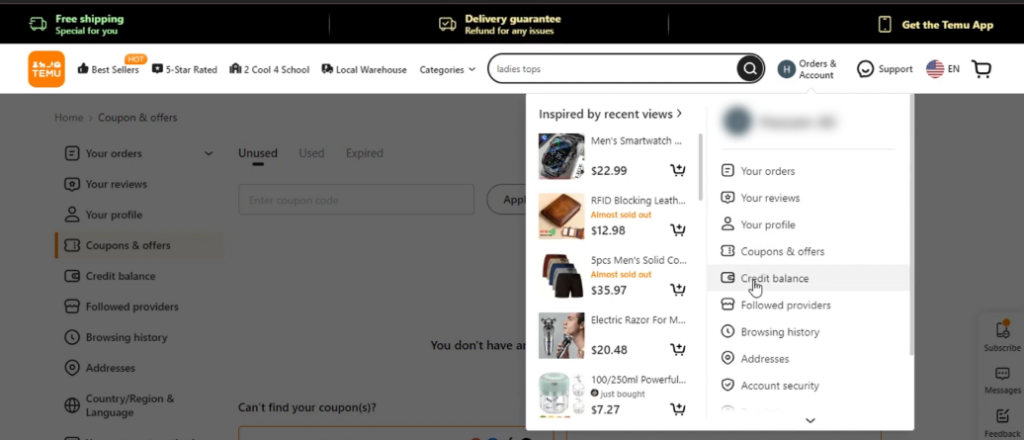
- Here is how you can check your credits on the Temu Website:
- Open the Temu website, making sure you’re logged in with your Temu account.

- Click on “Orders & Account” next to your Profile icon at the top.
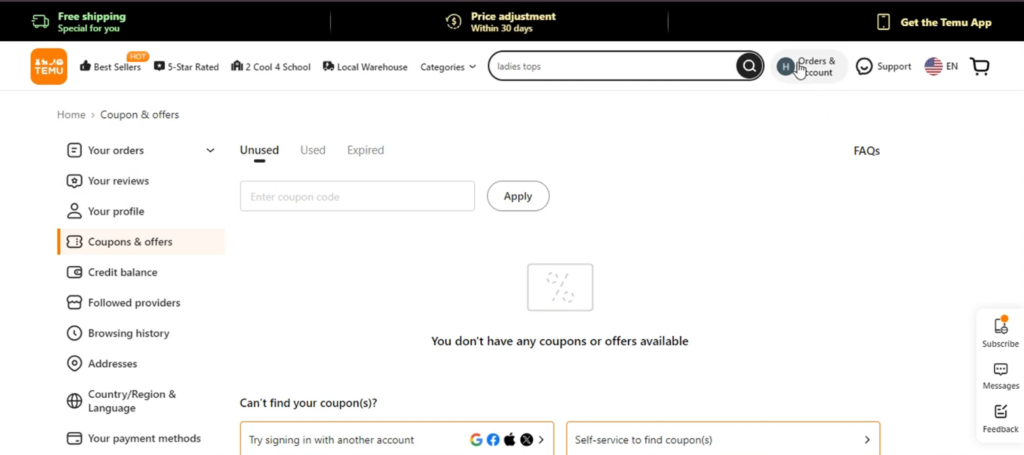
- Select “Credit Balance” from the options.
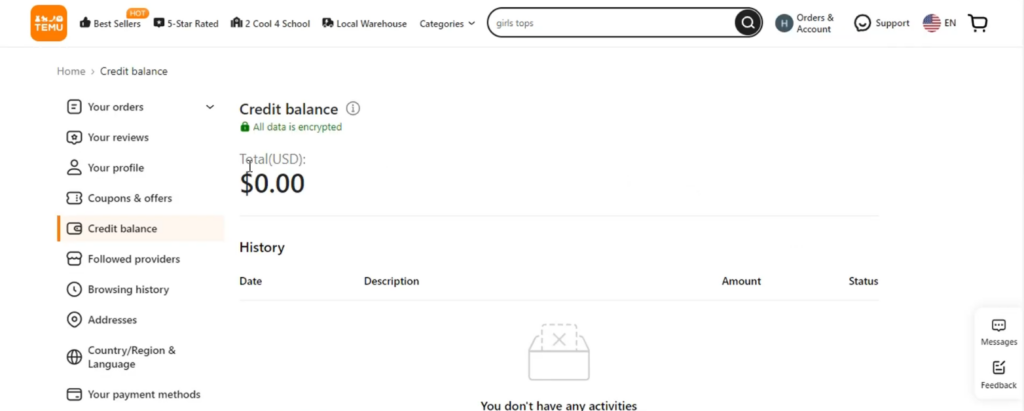
- A page will open, displaying your credit balance.
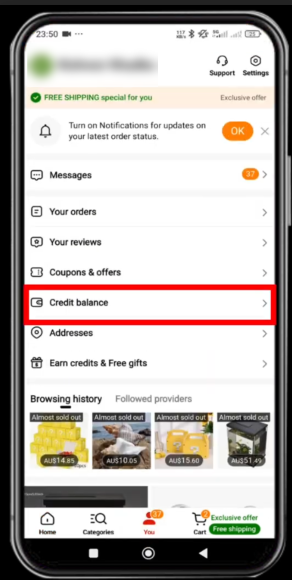
To check your credit on your mobile device, you can follow these steps:
- Open the Temu app on your mobile device.

- Tap on the “You” icon at the bottom of the screen.

- Click on “Credit Balance”.
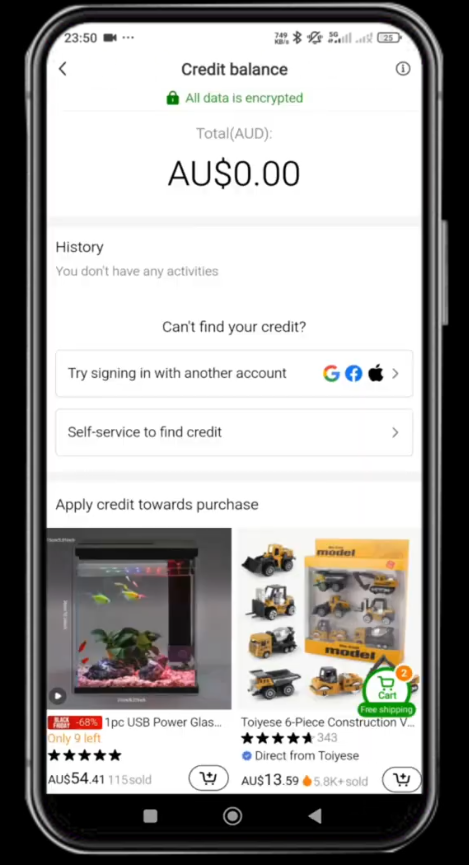
- In the appearing screen, you can view your credit balance.
Credit Expiration and Validity
You may have a question as to whether Temu Credits expire. Temu Credits are valid forever, and they don’t have an expiration date.
Maximizing Your Temu Credit Earnings
Participate Actively
The more you participate in Temu’s activities and promotions, the more credits you can earn. Make sure to check the app or website regularly to see if there are any new opportunities to earn credits.
Refer Friends and Family
If you have friends or family who are interested in Temu, you can share your referral link or code with them. This is a good way to earn a lot of credit quickly.
Here are the steps:
- Open the Temu app on your mobile device. Ensure you’re logged in with your specific account.
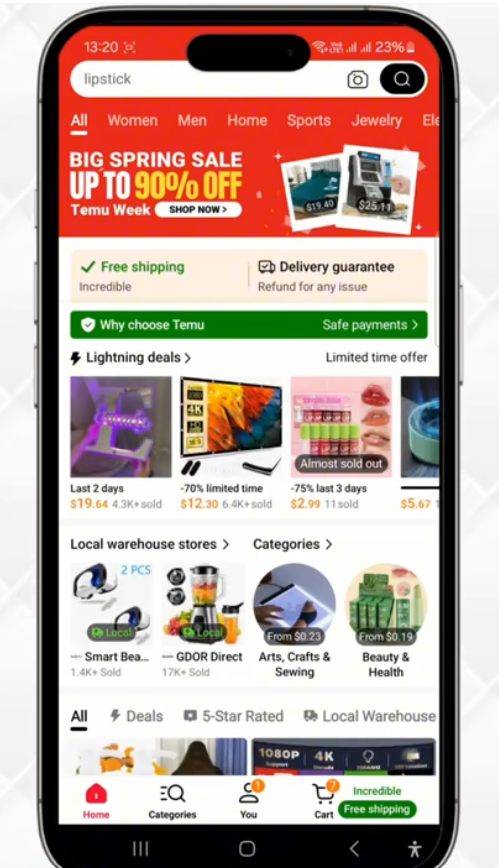
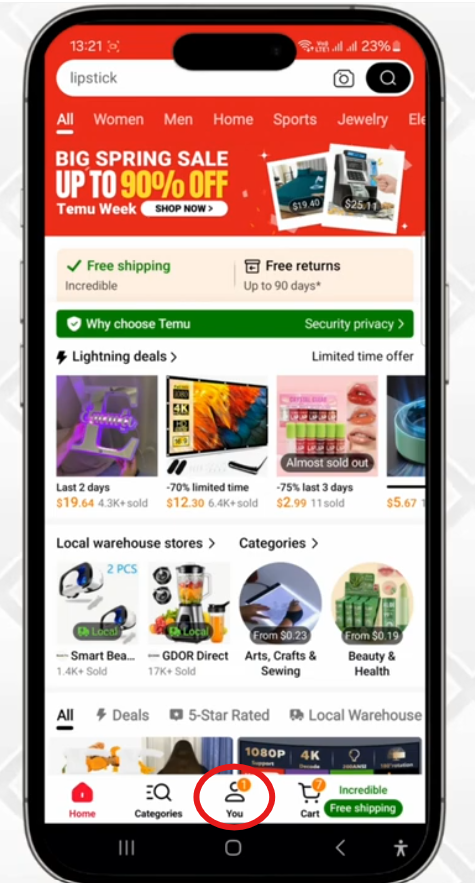
- Tap on “You” at the bottom.
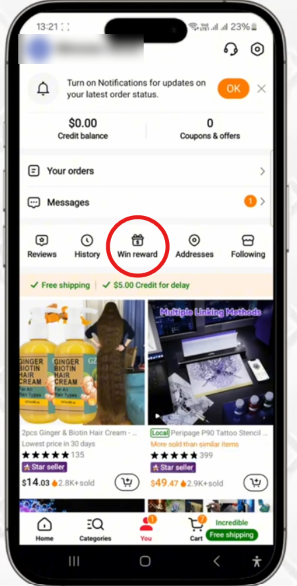
- Tap on “Win Reward” (between History and Addresses).
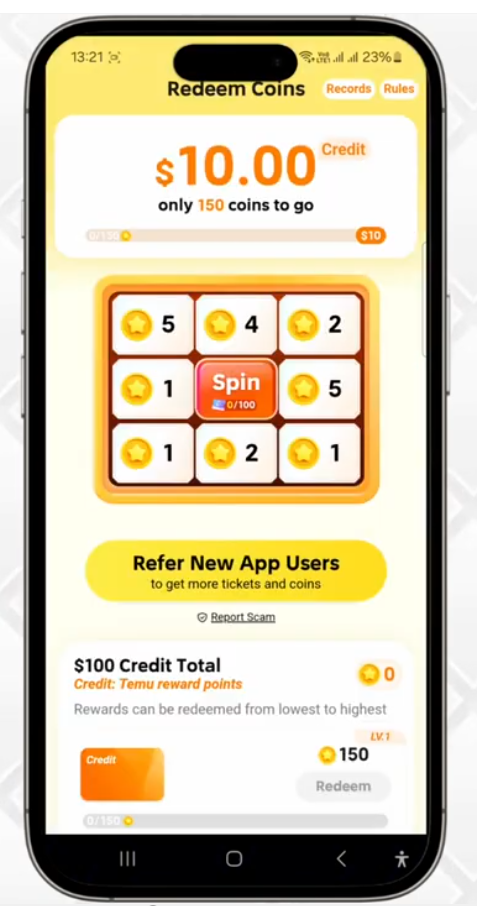
- Once you tap on it, you’ll be taken to the Earn Credits and Free Gifts section. Here you’ll see several options. Tap on the “Redeem Credit” option.

- Tap the option that says “Refer New App Users.“
- You’ll be taken to an interface where you can share your referral. You can choose options such as Facebook Messenger, WhatsApp, and others. Alternatively, you can also choose other options, such as “Copy Link”. Here we’ll select this option.

- Follow the on-screen instructions to quickly earn Temu Credits.

Stay Updated on Promotions
You should keep an eye out for special promotions or events that give extra credits. These promotions can also help you boost your credit balance.
Conclusion
Above, you’ll find all the info as to how Temu Credits work, including their definition, earning methods, and usage. By understanding and utilizing them, you can maximize the benefits of the trendy shopping platform.
Frequently Asked Questions (FAQs)
What are Temu Credits?
They’re a form of virtual currency that you can use to get discounts on Temu.
How do I earn Temu Credits?
You can earn them by participating in promotional events, referring friends or other activities on the platform.
How do I use Temu Credits?
You can apply them at checkout to get a discount on your order.
Do Temu Credits expire?
No, Temu Credits don’t expire and are valid forever.
Can I combine Temu Credits with other discounts?
Yes. You can often combine them with other coupons or promotions.