



















.png)
 简体中文
简体中文 
Most creators upload Shorts and wait for the algorithm to take over. The ones who consistently break through treat Shorts as a separate optimization system — not a faster version of long-form YouTube. This guide explains the key factors that help your Shorts gain traction. It covers keyword research for short-form search. It also shares retention tactics that keep the algorithm pushing your videos. You will also learn simple analytics habits that show what to improve before your next upload.

How YouTube Shorts SEO Works? (And Why It’s Different)
Standard YouTube SEO is largely query-driven — you target a search term, optimize your metadata, and rank in search results over time. Shorts operate on a dual system. They can show up in Google Search, YouTube Search, and the Shorts shelf. But most views come from the algorithm-curated Shorts feed. This feed works more like a behavior-based recommendation system than a traditional search index.

That means the optimization levers are split. Titles, descriptions, and hashtags feed the search side. Watch time, retention rate, and loop count feed the feed side. Neglect either, and you’ll hit a ceiling fast. A Short that ranks in search but loses viewers after two seconds won’t earn continued feed distribution. A Short with excellent retention but vague metadata won’t capture search traffic.
The Two Discovery Paths: Search vs. Shorts Feed
Titles, descriptions, and hashtags serve search discovery — when someone types a query into YouTube or Google, this metadata connects your Short to that intent. Loop rate, audience retention, and engagement signals (likes, comments, shares) serve feed distribution — these determine whether the algorithm promotes your Short in the Shorts shelf to passive browsers. Both paths reinforce each other: a well-titled Short that also retains viewers earns double exposure and outperforms content optimized for only one channel.
Keyword Research for YouTube Shorts
Shorts keyword research follows a different logic than standard YouTube research. Search volume matters less because the Shorts feed can amplify even low-search-volume content when retention signals are strong. The main focus is on finding words your audience would really search for. You also want to catch trending topics early before they get too popular.
Here are four actionable methods:
- YouTube search bar autocomplete with “Shorts” as a qualifier. Type your main topic into YouTube’s search bar, followed by the word “Shorts” (e.g., “budget travel Shorts”) and note down the autocomplete suggestions. These reflect real queries filtered toward short-form intent.
- Competitor Shorts analysis. Find the top three creators in your niche who post Shorts consistently. Sort their videos by “Most Popular” and analyze the titles of their top ten Shorts. Patterns in phrasing, question formats, and recurring keywords indicate what the audience is searching for and engaging with.
- Google Trends → YouTube filter. Open Google Trends, enter a topic, and switch the search type to “YouTube Search.”


This surfaces trending queries specifically on YouTube, and the timeline reveals whether interest is rising or falling — useful for deciding whether to publish immediately or wait.
- YouTube Studio “How viewers find your Shorts” report. For existing channels, navigate to the Shorts analytics tab and check the traffic source breakdown. This shows which search terms drove clicks to your Shorts and whether viewers arrived via YouTube Search, the Shorts feed, or external sources.
Evergreen vs. Trending Keywords: Which to Prioritize?
If your channel is new, lean toward trending topics to earn early traction — the Shorts feed rewards velocity, and trending content carries built-in audience momentum. Once past the initial growth phase, balance trending Shorts with an evergreen library that generates consistent search traffic over months. Think of trending Shorts as traffic spikes and evergreen Shorts as your steady baseline.
Title Optimization for YouTube Shorts
A Shorts title has two jobs: pull clicks from search results and accurately describe the content so viewers stay. Misaligned titles spike early drop-off, which directly damages retention signals and hurts algorithmic distribution.
Follow these rules:
- Keep titles under 60 characters. Anything longer gets truncated in mobile search results, cutting off your keyword before viewers finish reading.
- Lead with the primary keyword in the first 3–5 words. YouTube’s indexing weights the front of the title more heavily. “Beginner guitar chords in 60 seconds” outperforms “Learn guitar in 60 seconds for beginners.”
- Write for how people search, not how you speak. Use the exact phrasing that surfaced in your autocomplete research.
- Avoid misleading hooks. Clickbait that mismatches the content increases bounce rate, which the algorithm reads as a negative retention signal regardless of the reason a viewer left.
Weak vs. strong title examples:
| Weak Title | Strong Title |
|---|---|
| “Watch this amazing kitchen hack!!!” | “5-Second Knife Sharpening Hack (No Tools)” |
| “My morning routine Short” | “3-Minute Morning Routine for Productivity” |
| “You won’t believe this tip” | “Why Your Sourdough Won’t Rise (Fix This)” |
Using Numbers and Questions in Shorts Titles
Two title patterns consistently improve click-through rate. Number-based titles (“3 Ways to…”, “5-Minute Fix…”) communicate a clear, digestible payoff before the viewer commits. Question-based titles (“Why Is Your Shorts Watch Time Low?”) create a curiosity gap that pulls clicks from search results. Use one pattern per title — combining both tends to read as cluttered and dilutes the impact of either.
Description and Hashtag Best Practices
Shorts descriptions are brief, but they’re indexed by both Google and YouTube. The first line carries the most weight — treat it as a second opportunity to reinforce the primary keyword from your title, not as a space to repeat the title word-for-word.
Apply these practices:
- Use the first sentence to expand on your keyword. If the title is “3-Minute Morning Routine for Productivity,” the first description line might read: “A simple morning productivity routine you can complete before your first meeting.”
- Keep the description to two or three sentences. Padding with filler text doesn’t improve SEO and isn’t read by viewers.
- Use 3–5 hashtags maximum. YouTube has confirmed that over-hashtagging can suppress reach — more hashtags are not better.
- Always include #Shorts. This signals the content type to the algorithm and ensures correct categorization in the Shorts shelf.
- Place hashtags in the description, not the title. Hashtags in the title use up limited character space and look cluttered in search results.
Hashtag formula:
1 broad hashtag (e.g., #Photography) + 1–2 niche hashtags (e.g., #StreetPhotographyTips) + #Shorts
Hook and Retention Optimization (The Most Important SEO Signal)
Audience retention rate and loop rate are the two metrics that determine whether the Shorts feed distributes your content widely or stops surfacing it entirely. Every other optimization in this article amplifies search discovery — this section determines algorithmic reach.

The core problem: Most Shorts lose 20–40% of their audience in the first three seconds. That early exit tells the algorithm the content wasn’t worth surfacing, and distribution stalls immediately.
To hold viewers through the opening, use one of these hook techniques:
- Show the payoff first. Open with the result, transformation, or punchline. Then walk viewers back through the process. This inverts traditional storytelling and works precisely because viewers expect to swipe.
- Pose a direct question. “Have you been doing this wrong the whole time?” makes the viewer feel personally addressed. It triggers engagement before they’ve made a decision about the content.
- Use a pattern interrupt. Start mid-action, mid-sentence, or with an unexpected visual. Anything that breaks the scroll rhythm buys two more seconds of attention.
- State the value immediately. “In the next 45 seconds, you’ll know exactly why your Shorts aren’t getting views.” Clear, specific, and self-qualifying — it filters in the right viewer and reduces bounce.
Designing for the Loop: How to End a Short That Gets Re-Watched
Loop rate measures how often viewers replay your Short immediately after it ends. A high loop rate signals to the algorithm that the content rewards re-watching, directly boosting distribution. Three structural techniques drive this:
- Circular narrative: End visually or verbally where you began. If the Short opens with a question, the final frame returns to that same question with the answer implied, creating an urge to re-watch the setup.
- Unresolved tension with a visual callback: Leave one beat slightly open, then cut back to an earlier frame. Viewers rewatch to catch what they might have missed.
- Audio match cut: Add an audio cue at the end that matches the opening line. This smooth audio change makes the loop feel planned, and viewers often watch it again without even noticing.
Using Captions to Extend Watch Time
A significant share of Shorts viewers watch with the sound off, particularly on mobile in public settings. Enabling auto-captions captures this audience and reduces swipe-away from viewers who can’t turn the sound on. Manually correcting auto-caption errors is worth the time — it improves accuracy and ensures keyword-rich phrases are rendered correctly for indexing purposes. If you add on-screen text, place the most important text within the first five seconds to reinforce the hook.
Audio and Visual Quality as Retention Signals
Poor audio triggers an immediate swipe decision. When a Short opens with background noise, wind interference, or distorted sound, viewers register “low quality” in under two seconds — and leave. That early exit directly degrades retention signals. The algorithm doesn’t distinguish between “I didn’t like this content” and “I couldn’t hear it.” The result is the same: reduced distribution.

Shoot vertically in 9:16 and fill the frame. A misframed footage with horizontal bars signals low effort and increases early drop-off. For lighting, even basic window light provides enough contrast to keep viewers engaged; dark or heavily shadowed footage creates the same “low quality” judgment that bad audio does.
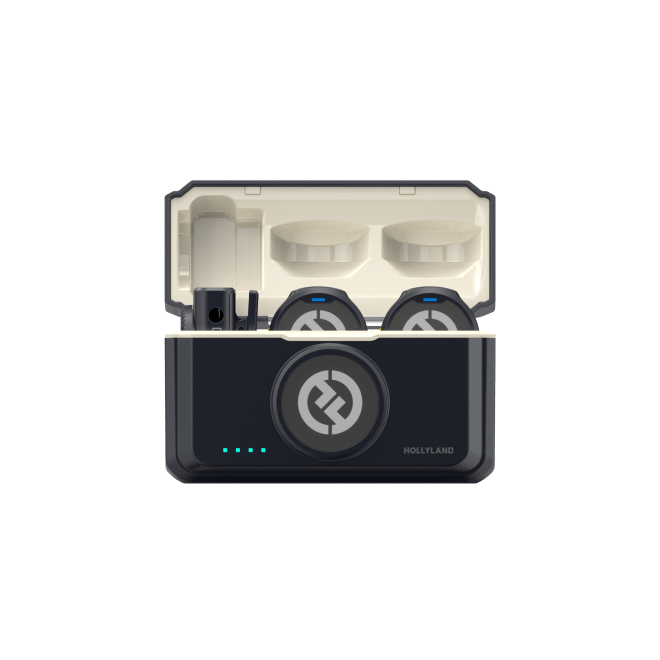
For creators filming on the go or in unpredictable noise environments, a compact wireless microphone eliminates ambient noise without adding bulk to a mobile setup. The Hollyland LARK M2 — a coin-sized clip-on mic weighing just 9 grams with a 40-hour battery — is designed for exactly this scenario. It stays invisible on clothing and delivers clean, consistent audio whether you’re filming at a desk or outdoors. Clean audio keeps viewers past the three-second mark. And those three seconds determine whether the algorithm shows your Short to the next ten thousand people.
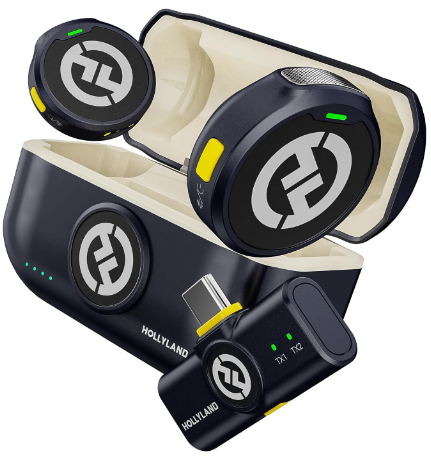
Hollyland LARK M2 - Mini Lavalier Microphone
An incredibly lightweight and compact wireless button microphone that captures high-fidelity audio.
Key Features: 9g Button Size | 48 kHz/24-bit | 40 Hours Battery
Engagement Signals: What the Algorithm Measures Beyond Views?
The Shorts algorithm weighs more than retention. Engagement actions taken within the Shorts player — likes, comments, shares, and subscription taps — all signal that a viewer responded to the content rather than just passively consuming it.

- Likes provide a baseline positive signal. Build content with a clear takeaway or satisfying payoff that makes liking feel natural.
- Comments are a high-value signal. End your Short with a specific question that invites a response — not a generic “what do you think?” Try: “Which of these did you not know? Drop the number below.” Specific prompts generate significantly more comments than open-ended ones.
- Shares extend reach beyond the algorithm’s direct sphere. Build at least one share-worthy moment into the script — a counterintuitive fact, a striking visual, or a practical tip viewers want to send to someone.
- Subscriptions earned from Shorts improve future distribution by increasing channel authority. Tie your CTA to the content value: “If you want part 2 of this, subscribe and I’ll post it this week,” outperforms a passive “like and subscribe” every time.
Thumbnail Selection for Shorts
You cannot upload a custom thumbnail for YouTube Shorts — only a key frame selected from within the video itself. That makes frame selection important rather than optional. Choose a frame with a clear facial expression or well-lit subject, readable on-screen text if present, and strong visual contrast against the surrounding feed environment.
A high-contrast, expressive thumbnail increases CTR in both the Shorts shelf and YouTube search results, where Shorts appear alongside standard video thumbnails competing for the same click. This step takes under sixty seconds after uploading — skip it, and you’re leaving the impression to chance on the one visual element you control.
Upload Consistency and Its Effect on Shorts Distribution
The Shorts algorithm builds a distribution profile for your channel over time based on how consistently you publish. Irregular posting — a burst of ten Shorts followed by two weeks of silence — disrupts that profile and reduces feed placement for subsequent uploads. A schedule of three to five Shorts per week is the standard benchmark for the growth phase.

Consistency doesn’t require daily production. Use YouTube Studio’s scheduling feature to batch-film one or two days per week and distribute uploads across the following days. The aim is to appear consistent to the algorithm, not to actually create content constantly. Treat consistency as a distributional support signal, not the primary focus of your optimization effort, because it amplifies the tactics above it rather than replacing them.
Tracking and Improving Shorts using YouTube Studio Shorts Analytics
Creators who skip analytics after publishing tend to repeat the same mistakes across every upload. YouTube Studio includes a dedicated Shorts analytics tab with metrics that don’t surface in standard video reporting. Track these five consistently:
| Metric | What It Tells You | Action |
|---|---|---|
| Average % Viewed | Hook and overall retention quality | Rewrite the first 3 seconds if below 70% |
| Loop Rate | How often viewers replay immediately after the Short ends | Redesign the ending if lower than similar Shorts |
| How Viewers Found Your Short | Traffic from Search vs. Shorts feed vs. Suggested | Increase optimization effort for the source performing best |
| Subscribers Gained | CTA effectiveness | Test different end prompts and measure the change |
| Impressions CTR | Title and thumbnail frame appeal combined | A/B test thumbnail frames on similar-topic Shorts |
Using A/B Signals to Improve Your Next Short
Pull your top five and bottom five performing Shorts from the last 90 days and compare them side by side. Look for the variable that differs most — hook format, title structure, hashtag count, Short length, or publishing day. Isolate one variable at a time and apply the finding to your next upload. Studio data converts optimization from assumption-based guesswork into a reliable feedback loop.
Frequently Asked Questions
Do hashtags in YouTube Shorts actually help SEO?
Yes, but only when used correctly. YouTube uses hashtags to categorize content and connect it to topic-based searches. Use 3–5 relevant hashtags — always including #Shorts — rather than flooding the description with 20 or more. YouTube has confirmed that hashtag stuffing can suppress reach rather than extend it. Focused, relevant hashtags consistently outperform volume.
How long should a YouTube Short be for the best SEO performance?
Shorter isn’t always better. Shorts between 30–55 seconds tend to achieve higher loop rates than 7–15 second clips, which improves algorithmic distribution. The key metric is average percentage viewed — a 50-second Short with 90% retention outperforms a 15-second Short with 60% retention. Optimize for completion rate, not brevity.
Does posting Shorts hurt channel growth for long-form content?
Not really. YouTube maintains separate feeds and metrics for Shorts and long-form video. Shorts that earn subscriptions can grow your long-form audience when the content topics are aligned. The risk comes from posting Shorts on unrelated topics. This can confuse subscribers, lower clicks on long videos, and weaken your channel’s authority over time. YouTube Studio Analytics
Can YouTube Shorts rank in Google Search?
Yes. YouTube Shorts appear frequently in Google’s Video and Web results, particularly for trending and how-to queries. Title and description keyword optimization directly impacts Google discoverability as well as on-platform performance. Treating Shorts metadata seriously pays off in both ecosystems simultaneously.
How many Shorts should I post per week?
Three to five Shorts per week is the standard benchmark during the growth phase. Consistency matters more than raw volume. A steady three-per-week schedule outperforms an irregular burst of ten uploads followed by a two-week gap. Use YouTube’s scheduling feature to maintain posting cadence without requiring daily production.
Conclusion
Work through the hierarchy: hook and retention optimization first, then keyword research and title accuracy, then hashtag structure, then engagement prompts and CTAs, then consistency. Before your next upload, run your last ten Shorts through the YouTube Studio analytics table from Section 10 and identify the one metric that most consistently underperforms — that’s your first fix. Optimize from evidence, not assumption, and each successive Short improves on a measurable baseline rather than a guess.